 ReviewFlow
The fastest way to fix the last 10% of AI-built UIs.
See what’s wrong, say it, keep reviewing. ReviewFlow captures the visual context your coding agent needs.
An animation of ReviewFlow in use: a review is recorded over a half-finished web app, five spoken remarks about spacing, alignment and a mobile overflow are each captured with the screenshot they refer to, and the resulting folder is dragged into a coding agent, which fixes all five.
Record while you review, say what looks wrong, and drag the folder ReviewFlow writes into your coding agent.
Seeing what’s wrong is easy. Explaining it is the annoying part.
The old way
- Notice issue
- Take screenshot
- Open crop tool
- Paste into chat
- Write out the CSS / visual problem
- Go back to app
- Find next issue
Repeat × 10
The ReviewFlow way
- Notice issue
- Say it out loud
- Next issue
AI builds the page. You still have to polish it.
90% - works
- layout exists
- components work
- page is usable
Last 10% - feels wrong
- spacing feels off
- things don’t quite align
- padding is inconsistent
- responsive states break
- something just looks wrong
That’s the part ReviewFlow is built for.
Three steps, and you are back to work
-
Record
Talk while you use the software. Say “this button does nothing” and point at it - normal speech, nothing to remember.
-
It finds the moments
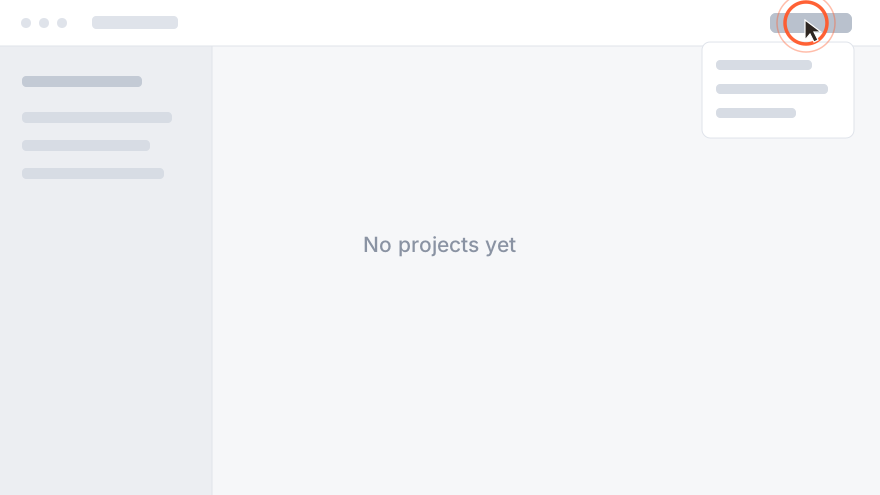
It works out where you were pointing at something, and cuts those frames with a ring drawn around your cursor.
-
Drag the folder in
One folder: the transcript and the screenshots it points at. Drag it into Claude Code and the agent has everything.
Works with Claude Code, Cursor and Codex - anything that can read Markdown and PNGs.
What you actually get
One flat folder with nothing an agent has to dig through. The video, the raw audio and the session data stay behind - reading them would only waste the agent's context. The alternative is a tool that screenshots on a timer and spends the window on frames nobody said anything about; this keeps the ones you did.
Under each frame it also writes the change to make and how to check it - never a selector or a class name, so nothing in the folder goes stale when the first fix re-renders the page. What you actually said stays above it, so your agent can disagree with the instruction.
review-fix-the-empty-state/
  ├── review.md
  ├── capture-001.png
  ├── capture-002.png
  └── capture-003.png
# Empty state offers no way to add the first project [00:00:04] So this is the projects list with nothing in it, and look at this - there is no button anywhere to make one.  **Change:** Add a primary action to the empty projects list that creates the first project. **Verify:** The empty projects list offers a visible way to create a project. [00:00:19] The only way in is this menu up here, which nobody is going to find. 
Browser agents can inspect your UI. They can’t know what you dislike about it.
- Playwright / browser tools
- Great for finding objective problems automatically.
- Claude Design, and in-browser pointers
- Great for pointing precisely, when the thing you are reviewing is a page in their browser.
- Annotation tools
- Great when you want to point and comment precisely.
- ReviewFlow
- For anything on your screen - a native app, a game, Figma itself - when you are looking through it and already know what feels wrong.
You shouldn’t need to speak CSS.
You say:
“This should line up with that.”
The button appears to have excessive left offset relative to the flex container’s content box, so its leading edge no longer shares an axis with the heading and body copy above it…
ReviewFlow captures the visual context so your agent still gets the right instruction.
Your screen never leaves your machine
This is a design decision, not a policy promise. Transcription needs your voice, so the audio is sent. Working out which moments matter needs the words, so the text is sent. Neither step needs the picture, so the picture is never uploaded.
| Data | Uploaded? | What happens |
|---|---|---|
| Microphone audio | Yes | Sent for transcription, then deleted |
| Transcript text | Yes | Used to find the moments you pointed at |
| Screen recording | No | Never uploaded anywhere |
| Screenshots | No | Cut from the recording on your machine |
Seven days free, then £5 or £8 a month
On either plan. Nothing is charged until the trial ends, and cancelling takes one click.
Start the free trial
macOS 12 or later · Windows 10 and 11 · on an Intel Mac, take the Intel build
Windows will say the publisher is unrecognised - the installer is not code-signed yet. Choose More info, then Run anyway. Why.
Included on every plan
- Unlimited reviews, fair use
- Transcription and moment-finding included
- macOS and Windows on one subscription
- Cancel in one click, from the app or the website
Sign in with your email and start the trial from the app. Prices include VAT - £8 advertised is £8 charged. Already subscribed? Manage your subscription.
Questions
Does it only work with Claude Code?
It is built for it, but the output is a plain folder of Markdown and PNGs. Anything that reads files can use it.
Why not Claude Design, or the pointer in Claude’s browser?
Use them - they are good, and they cost nothing. Both need the thing you are reviewing to be a page in their browser. This records your screen, so it works on a native app, a game, or Figma itself.
Won’t a design system fix this?
For new work, yes, and you should have one. It does nothing about the screen in front of you now - a system stops the next drift, not the twelve things already on the page.
Doesn’t the first fix make the rest stale?
Not here. The folder holds frozen frames with a ring where the cursor was, and what you said about each one - no selectors and no DOM references, so nothing in it goes out of date when the page re-renders.
Does it have to be software?
No - it captures whatever is on your screen, so people use it on documents, slides and designs too. The moment-finding is tuned for software vocabulary, so it is sharpest there.
How long can a recording be?
Long enough for a real walkthrough, though most are shorter than you would think - one to five minutes covers most of what needs saying.
Why is there no web version?
A browser cannot see where your desktop cursor is, so it could not draw the ring that shows the agent what you were pointing at. It is also the reason this works on things a browser tool cannot reach.
Is the installer signed?
The macOS build is signed and notarised by Apple. The Windows build is not yet, so Windows may ask you to confirm before it runs.
Who is behind it?
One developer, in the UK. Email lands in my inbox, not a queue: support@reviewflow.review.